
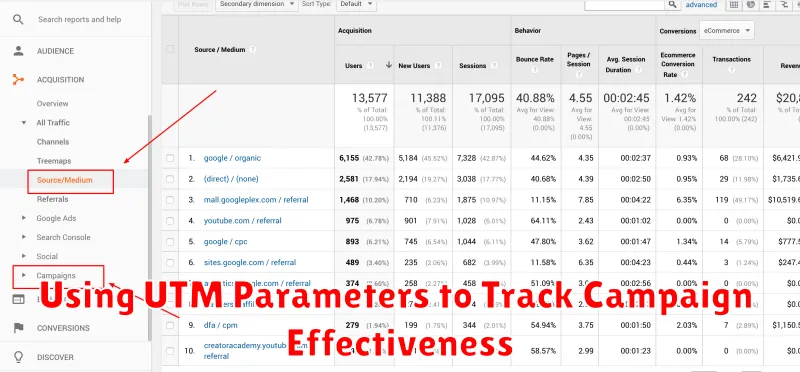
In today’s complex digital marketing landscape, understanding the effectiveness of your campaigns is paramount. Accurately attributing conversions and analyzing campaign performance requires robust tracking mechanisms. UTM parameters provide a powerful and versatile solution for gaining granular insights into your marketing efforts. By leveraging these simple yet effective tags, you can unlock a wealth of data that will inform your strategy and optimize your return on investment (ROI). Learn how UTM parameters empower you to measure campaign success, identify top-performing channels, and refine your targeting for maximum impact.
This article will provide a comprehensive guide to using UTM parameters for effective campaign tracking. We will explore the core components of UTM codes, demonstrating how to structure them correctly and implement them across various platforms. You’ll learn how to track campaign sources, campaign mediums, campaign names, campaign terms, and campaign content to gain a holistic understanding of your marketing performance. By mastering UTM parameters, you can make data-driven decisions that enhance your marketing ROI and achieve your business objectives.
What Are UTM Parameters?
UTM parameters are simple tags added to the end of a URL that allow you to track the performance of your marketing campaigns across different sources and platforms. They provide valuable data that helps you understand where your website traffic is coming from and which campaigns are most effective.
These parameters are not visible to the user unless they specifically look at the address bar. They work behind the scenes, passing information to your analytics tools like Google Analytics.
Essentially, they act as tracking markers, enabling you to identify the origin of each website visit generated by a specific campaign.
Setting Up UTM Codes in Google Analytics
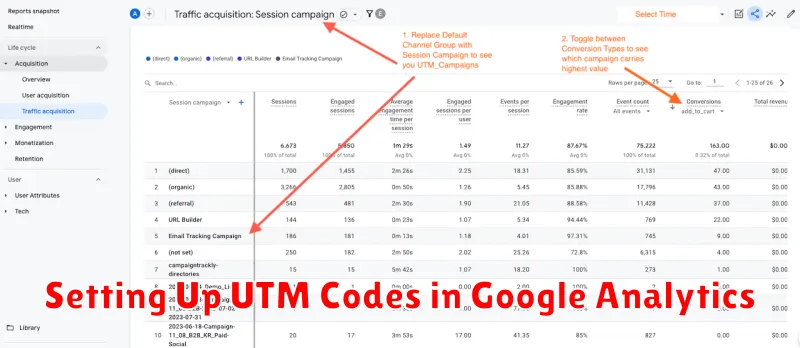
While Google Analytics automatically captures some traffic source data, using UTM parameters provides significantly more detailed insights into your marketing campaigns.
You don’t need to “set up” UTM codes within the Google Analytics interface itself. Instead, you add these parameters to your campaign URLs. Google Analytics is then configured to automatically recognize and process these parameters.
The key is to use a consistent naming convention for your UTM parameters. This will ensure clean and easily reportable data within your Google Analytics reports. You can analyze your campaign performance by navigating to the Acquisition -> Campaigns -> All Campaigns report in Google Analytics.
Important UTM Parameters:
- utm_source: Identifies the source of your traffic (e.g., google, facebook, newsletter).
- utm_medium: Identifies the medium (e.g., cpc, email, social).
- utm_campaign: Identifies the specific campaign name (e.g., spring_sale, product_launch).
- utm_term: (Optional) Identifies the paid keywords used.
- utm_content: (Optional) Differentiates between different versions of the same ad or link.
Naming Conventions for Accuracy
Consistent and logical UTM parameter naming conventions are crucial for accurate campaign tracking and analysis. A well-defined system enables efficient data segmentation and reporting.
Use a structured approach to define values for each parameter (utm_source, utm_medium, utm_campaign, utm_term, utm_content). This avoids ambiguity and ensures data integrity.
Consider using lowercase letters, numbers, and underscores for parameter values. Avoid spaces and special characters to prevent errors and ensure compatibility across different analytics platforms.
Develop a centralized document outlining your naming conventions and share it with all team members involved in campaign creation and analysis. This promotes consistency and avoids discrepancies in data reporting.
Tracking Multiple Channels
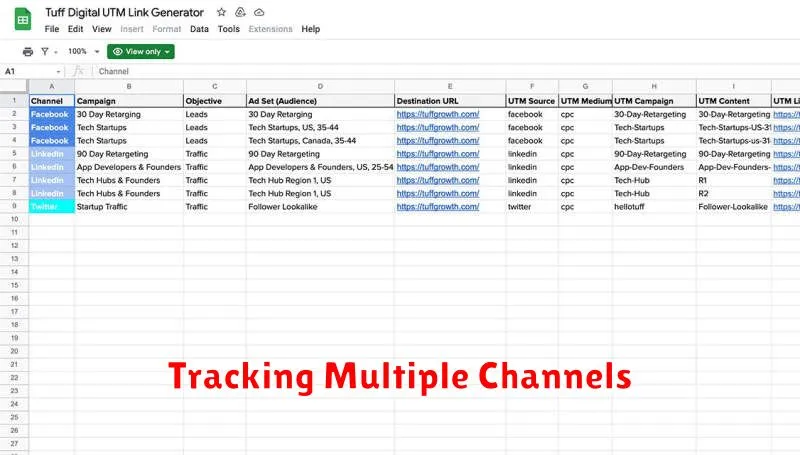
When running a marketing campaign, you’ll likely leverage multiple channels to reach your target audience. This could include social media platforms, email marketing, paid advertising, and organic search. Using UTM parameters allows you to differentiate the traffic coming from each of these sources.
For example, you might run the same promotion across Facebook, Twitter, and Instagram. By assigning unique UTM parameters to each platform’s link, you can accurately assess which channel is driving the most conversions or website traffic. This data is crucial for optimizing your campaign spend and focusing your efforts on the most effective channels.
Consider this scenario: you’re running a sale and promoting it with email and social media. You could use the following UTM parameters:
| Channel | UTM Source | UTM Medium |
|---|---|---|
| email_newsletter | ||
| social | ||
| social |
This clear tagging allows you to analyze the performance of each channel in your analytics platform, providing valuable insights into your campaign’s overall effectiveness.
Analyzing Campaign Performance
After diligently implementing UTM parameters and collecting data, the crucial next step is analyzing campaign performance. This analysis provides invaluable insights into which campaigns are driving the most valuable traffic and conversions.
Begin by segmenting your data by UTM parameters within your analytics platform. This allows you to isolate the performance of each specific campaign, source, medium, and content. For example, you can compare the performance of a social media campaign on Facebook versus Instagram by filtering based on the utm_source parameter.
Key performance indicators (KPIs) to focus on include conversion rate, bounce rate, pages per session, and average session duration. By comparing these metrics across different campaigns, you can identify high-performing and underperforming areas. This data-driven approach empowers you to optimize campaigns for better results.
Consider visualizing your data using tables or charts to quickly identify trends and patterns. This visualization simplifies the process of understanding complex data sets and facilitating data-driven decision-making.
Avoiding Common UTM Mistakes
While UTM parameters are invaluable for tracking campaign effectiveness, common mistakes can hinder their accuracy and usefulness. Consistency is key. Employ a standardized naming convention for your campaigns, sources, and mediums. This ensures clear reporting and avoids fragmented data.
Another frequent error is neglecting to track all campaign components. Ensure you’re using UTM parameters across all platforms and links associated with a specific campaign, including emails, social media posts, and banner ads. This provides a holistic view of performance.
Case sensitivity can also create issues. UTM parameters are case-sensitive, meaning “Social” and “social” will be tracked as separate sources. Maintain consistent capitalization to avoid skewed data.
Finally, avoid using UTM parameters on internal links. This can overwrite referral data and misrepresent the true source of traffic.
Automating UTM Link Generation
Manually creating UTM parameters for each link can be tedious and error-prone, especially for large campaigns. Automating this process significantly improves efficiency and accuracy.
Several methods exist for automating UTM link generation. Spreadsheet formulas can be utilized to concatenate UTM parameters with your destination URLs. This is a relatively simple solution for basic needs.
For more advanced requirements, dedicated UTM builders or marketing automation platforms offer streamlined workflows. These tools often include features like preset campaigns and custom templates, simplifying the process further. They can also integrate with other marketing tools to automate link distribution and reporting.
By automating UTM link creation, marketers can save valuable time and reduce the risk of errors, ensuring accurate campaign tracking and analysis.
